Showing posts with label Dev. Tools. Show all posts

Wednesday, August 13, 2014

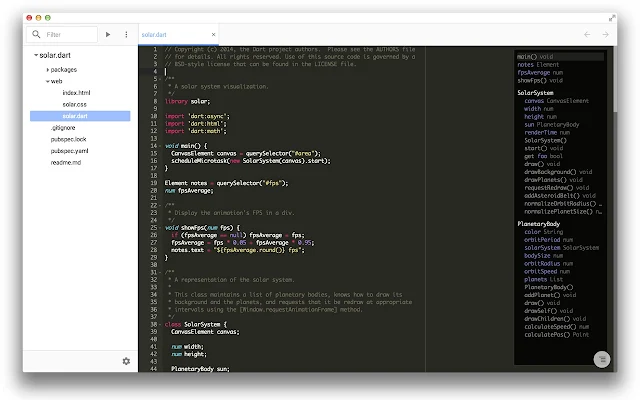
Chrome Dev Editor (developer preview) - tool for building apps on Chrome platform

Chrome Dev Editor (CDE) is a developer tool for building apps on the Chrome platform - Chrome Apps and Web Apps, in JavaScript or Dart. CDE is built as a Chrome App written in Dart and uses Polymer. CDE runs on Windows, Mac, Linux, and Chrome OS! CDE supports Git, Polymer, and mobile development.


Check out the video from Google I/O 2014 about building apps on the Chrome platform and how Chrome Dev Editor (CDE) is build.


Tuesday, December 3, 2013

Emulation in Chrome DevTools

You can now realistically emulate many device characteristics on desktop, saving you time and making your iteration loop much faster. You can emulate screen size, devicePixelRatio, and ❮meta viewport❯ with full touch event simulation. More at http://html5rocks.com/en/tutorials/developertools/mobile/

Thursday, October 31, 2013

Google Web Designer

Google Web Designer is an advanced web application that's built with HTML5 which lets you design and build HTML5 advertisements and other web content using an integrated visual and code interface. Using Google Web Designer's design view you can create content using drawing tools, text, and 3D objects, and you can animate objects on a timeline. Once you're done creating your content, Google Web Designer outputs clean human-readable HTML5, CSS3, and Javascript.

When you create advertising creatives with Google Web Designer, you can use a library of components that lets you add image galleries, videos, ad network tools, and more.

Google Web Designer's Code view lets you create CSS, JavaScript, and XML files, using syntax highlighting and code autocompletion to make your code easier to write, with fewer errors.

Link: https://www.google.com/webdesigner/

Saturday, September 14, 2013

Simulate Touch events on Google Chrome Desktop

To simulate Touch Events on Google Chrome Desktop:

Open Developer Tools by clicking on Chrom's Menu, select Tools, Developer Tools.


Click on the Setup icon.


Select Overrides Settings, scroll down to enable Emulate touch events.


Wednesday, May 15, 2013

Develop Mobile Web Applications On Your Android Device, with upcoming NetBeans IDE 7.4

It's a blog post from Oracle NetBeans Web Client, introduces an exciting new feature in the upcoming NetBeans IDE 7.4. Namely, JavaScript debugging and visual CSS editing on Android devices.

With this feature, you can develop mobile web applications on real Android device, with Netbeans IDE 7.4 and Android SDK.

This support will be included in NetBeans IDE 7.4, which will be released later in 2013. However, you can already try this out now in a recent nightly build of NetBeans 7.4.


https://blogs.oracle.com/netbeanswebclient/entry/develop_mobile_web_applications_on

Saturday, April 13, 2013

Intel Introduce the new Intel® HTML5 Development Environment

Intel introduce the new set of cross-platform HTML5 tools as Intel's HTML5 Development Environment to help developer more easily develop great HTML5 apps for all of target devices.

Source: http://software.intel.com/en-us/html5

Wednesday, March 27, 2013

Profiling a mobile site with Chrome DevTools and Android


Learn how you can use Chrome DevTools against a page running on your Android device. Chrome DevTools is just as powerful for the mobile web as it is for the desktop web.

Monday, March 18, 2013

Install Python on Ubuntu

To install Python on Ubuntu. simple search Python in Ubuntu Software Center.

Install Python on Ubuntu


You can install both Python 2.x and 3.2 together.

Both Python 2.7.3 and 3.2.3 installed

Thursday, March 14, 2013

Code Formatting Features in NetBeans IDE


Code Formatting Features in NetBeans IDE

This screencast demonstrates how to use a few important formatting features in the NetBeans IDE such as, general indentation, braces and others. This demonstration is based on the Formatting project available in the NetBeans Sample Code Library.

Friday, March 1, 2013

Aptana studio Beginner's Guide


Aptana Studio 3 is a powerful web development IDE based on the Eclipse platform and provides many innovative technologies and features for developing effective, modern hi-standard web-applications. Aptana has been around since 2008 and it provides language support for HTML, CSS, JavaScript, Ruby, Rails, PHP, Python, and many others by using plugins.

"Aptana Studio Beginner's Guide" is packed with the author’s experience of several years developing with Aptana Studio. It's not just a powerful guide, it's a practical, hands-on introduction to Aptana Studio as a whole. If you want to harness Aptana Studio to enhance your web-development productivity, then read this book.

You will start by setting up your own installation of Aptana Studio, and will be guided step-by-step through the various stages of developing with Aptana Studio.

You will learn how to manage all your work in workspaces and projects, and how you can optimize your projects depending on the nature of the project.

In addition, you will be taught how to work on remote servers or manage your source code with Git and SVN.

Finally, you will have a fully configured IDE and be equipped with the knowledge about how to work and manage large web-projects.

Approach

Accompanied by the plenty of example code and step-by-step instructions, this book will escalate you from a novice to an expert in no time.

Who this book is for

This book is for anyone who is looking for an IDE for effectively developing web applications. You will find this book interesting if you are working with common web technologies such as HTML5, JavaScript, or PHP. This book assumes no prior knowledge of Aptana Studio 3 or the named web technologies.

Wednesday, February 13, 2013

Ubuntu App Design Guides announced

The App Design Guides site is the first installment of a live resource that will organically grow to provide guidance and enable app developers to build stunning, consistent and usable applications on a diversity of Ubuntu devices.

Together with the Ubuntu SDK preview, the App Design Guides complete yet another chapter in the Ubuntu app developer story. Developers have now the tools to create beautiful software, along with all the information related to UX, behaviour, patterns and visual design to ensure their apps provide a solid, clean and enjoyable user experience.

All of these tools and guides are available to everyone as open source and for free.

http://design.ubuntu.com/apps

App Design Guides site


Thursday, December 20, 2012

Wednesday, September 5, 2012

Open webOS 1.0 Beta released

The Beta of Open webOS 1.0 has been released. The Beta includes two build systems, aimed at enabling developers in two ways:
  • Our OpenEmbedded-based Build System
    OpenEmbedded is specially targeted at managing porting to multiple platform architectures, and is an ideal base for contributors interested in bringing Open webOS to new hardware. The Beta release opens our ongoing development branch targeting an ARM emulator.
  • Our Linux Desktop Build
    Develop on your own desktop, where you have access to all of your own tools and code. This is the ideal, productive environment for OS developers to enhance the user experience and integrate other best-of-breed open source technologies. The desktop build supports running System Manager as an application on your desktop, and the Core Applications running within System Manager.

Open webOS 1.0 Beta


http://www.openwebosproject.org/


golangide: IDE for GO Language

LiteIDE is a simple, open source, cross-platform IDE. golangide is a LiteIDE Released for Go.

Base Features:
  • Mime type basis system
  • System environment manage
  • Build system manage
  • Debug system simple and open
  • Kate syntax and style scheme
  • WordApi complete helper

Golang Support:
  • GOPATH Project
  • Go Playground
  • Golang ast view
  • Godoc browser
  • Gocode helper
  • Project wizard
  • Project build
  • Source build

System
  • Windows
  • Linux
  • MacOSX


Wednesday, August 22, 2012

Google announced Octane: the JavaScript benchmark suite for the modern web

Google released Octane, a JavaScript benchmark suite that aims to measure a browser’s performance when running the complex and demanding web applications that users interact with daily.

overview of the new tests:
  • Box2DWeb runs a JavaScript port of a popular 2D physics engine that is behind many well-known simulations and web games.
  • Mandreel puts a JavaScript port of the 3D Bullet Engine to the test with a twist: The original C++ source code for the engine is translated to JavaScript by Onan Games’ Mandreel compiler, which is also used in countless web-based games.
  • Pdf.js is based on Mozilla’s PDF reader and shows how Javascript applications can replace complex native browser plug-ins. It measures how fast the browser decodes a sample PDF document.
  • GB Emulator is derived from an open source emulator of a famous game console running a 3D demo.
  • CodeLoad measures how quickly a JavaScript engine can bootstrap commonly used JavaScript libraries and start executing code in them. The source for this test is derived from open source libraries (Closure, jQuery).

Source: Chromium Blog - Octane: the JavaScript benchmark suite for the modern web

Wednesday, June 20, 2012

Creating Your First Ubuntu App

A tutorial for how to create you first Ubuntu application. The tutorial shows how to create a simple web browser by generating a project, setting up your user interface, writing the code, and creating an Ubuntu package.


Saturday, June 16, 2012

jsFiddle - an online editor for web snippets.


jsFiddle is a playground for web developers, a tool which may be used in many ways. You can use it as an online editor for snippets build from HTML, CSS and JavaScript.

Play jsFiddle online: http://jsfiddle.net/


Chrome App version is available in Chrome Web Store here.


Monday, May 28, 2012

Monkey - a next-generation games programming language

  • Monkey is a next-generation games programming language that allows you to create apps on multiple platforms with the greatest of ease.
  • Monkey works by translating Monkey code to one of a different number of languages at compile time - including C++, C#, Java, Javascript and Actionscript.
  • Monkey games can then be run on potentially hundreds of different devices - including mobile phones, tablets, desktop computers and even videogame consoles.
  • Monkey saves you time and allows you to target your apps at multiple markets and app stores at once, potentially mutiplying sales several times over.

WebSite: http://www.monkeycoder.co.nz/


Monkey Game Development: Beginner's Guide

The first two chapters will provide you with grounding in Monkey. In each subsequent chapter you will create a complete game deployable to either iOS, Android, HTML5, FLASH, OSX, Windows and XNA. The last chapter will show you how to monetize the games so you can be commercially successful in the app development world. Do you want to quickly create games deployable to all the major desktop and mobile platforms?, if so look no further. You will learn how to utilize the highly versatile Monkey compiler to create 2d games deployable almost anywhere.

Thursday, May 24, 2012

Web base Interactive g++ compiler - GCC Explorer

GCC Explorer (http://gcc.godbolt.org/) is a web base g++ compiler. You can enter your C++ code and view the assembly output by various version of g++ compiler.

GCC Explorer