Tuesday, February 28, 2012
Developing apps with Qt, featuring the Nokia 808 PureView
Executives from National Geographic, Pikchur, and 10tons discuss how easy it has been to use Qt in the development of their latest apps for Nokia's smartphones. Combining that ease of development, with Nokia's top-of-the-line hardware, global brand recognition, and distribution in more than 190 countries worldwide with Nokia Store, developers can reach more users, in more places, everyday. This video features the stunning new Nokia 808 PureView. See how easy it is to develop for Nokia with Qt: http://www.developer.nokia.com/Develop/Qt/

Implement draggable object using jQuery UI
Example to implement draggable object using jQuery UI:
<!DOCTYPE html>
<html>
<head>
<meta charset="UTF-8">
<title>Mobile-Web-App: jQuery UI draggable</title>
<script src="http://code.jquery.com/jquery-1.7.1.min.js"></script>
<script src="http://code.jquery.com/ui/1.8.18/jquery-ui.js"></script>

<script type="text/javascript">
function onloaded(){
 $( "#draggable" ).draggable();
}


</script>
</head>
<body onload="onloaded();">
<h1>Mobile-Web-App: jQuery UI draggable</h1>

<img id = "draggable" src="Mobile-Web-App.png"></img>
</body>
</html>
Monday, February 27, 2012
HTML5 Camera
Example of using HTML5 Camera.

Example of HTML5 Camera run on Opera Mobile web browser on Android tablet.

Example of HTML5 Camera run on Opera Mobile web browser on Android tablet.
<!DOCTYPE html>
<head>
<title>Mobile-Web-App: Camera</title>
</head>
<html>
<body>
<h1>Mobile-Web-App: Camera</h1>
<p id="vstatus"></p>
<video id="myvideo" autoplay></video>

<script type="text/javascript">
var myVideo = document.getElementById("myvideo");
var vStatus = document.getElementById("vstatus");

if(navigator.getUserMedia) {
 navigator.getUserMedia("video", successCallback, errorCallback);
} else {
 vStatus.textContent = "Your browser not support Camera!";
}

function successCallback( stream ) {
 myVideo.src = stream;
}

function errorCallback( error ) {
 vStatus.textContent = "Error: " + error.code + " !";
}

</script>
</body>
</html>
Opera Mobile for Android now support HTML5 Camera

What's in updated version (12.0) of Opera Mobile web browser for Android:
- Added:
- Support for more than 9 speed dials
- WebGL support
- HTML5 Camera (Android 2.1+)
- HTML5 Device Orientation
- HTML5 parser (Ragnarök)
- Android Beam support (NFC)
- Added Flash support on Android 4.0.3
- RTL text support in UI
- Turkish translation
- Improved:
- Keyboard support
- Scrolling on high pixel devices (Galaxy Nexus)
- Closing of tabs
- SSL connection speed
- Tab session restore
- Find in page UI
- Upgraded:
- Presto core (2.10.254)
Hello Dart!
- Install and start DartEditor
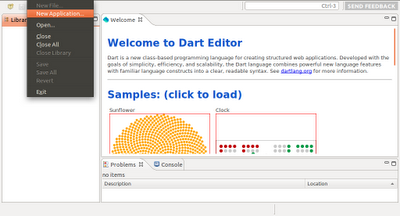
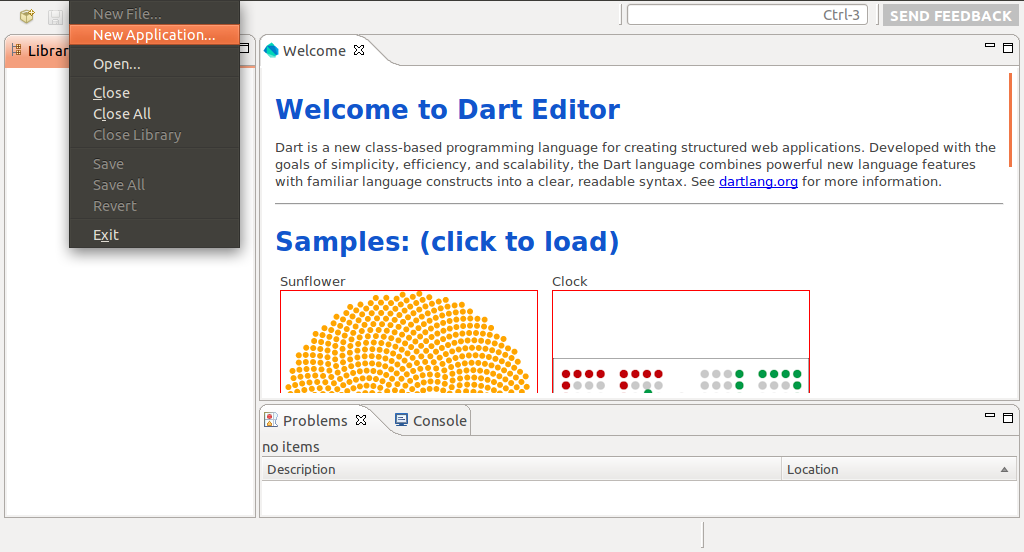
- Click File -> New Application in Eclipse menu
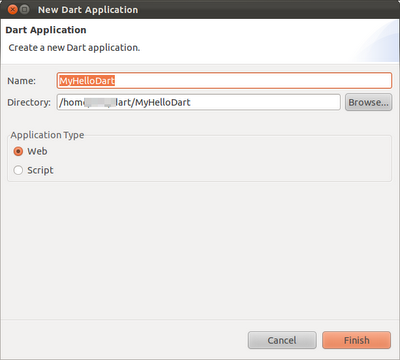
- Enter Name(and also Directory) of your Dart application, check Application Type of Web, and click Finish.
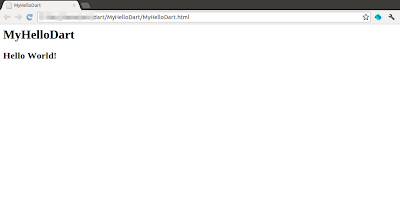
- A dummy Hello World! of Dart will be generated. Click the Run (green arrow) button to start the Dart application. The Hello World! Dart application will be loaded in build-in Chromium with Dart VM.
Remark: if you cannot run the application or cannot generate Javascript because of:
error while loading shared libraries: libcrypto.so.0.9.8: cannot open shared object file: No such file or directory
You have to install libssl0.9.8. Refer to the article: Cannot launch Dart application - error while loading shared libraries: libcrypto.so.0.9.8
- Click File -> New Application in Eclipse menu
- Enter Name(and also Directory) of your Dart application, check Application Type of Web, and click Finish.

- A dummy Hello World! of Dart will be generated. Click the Run (green arrow) button to start the Dart application. The Hello World! Dart application will be loaded in build-in Chromium with Dart VM.

Remark: if you cannot run the application or cannot generate Javascript because of:
error while loading shared libraries: libcrypto.so.0.9.8: cannot open shared object file: No such file or directory
You have to install libssl0.9.8. Refer to the article: Cannot launch Dart application - error while loading shared libraries: libcrypto.so.0.9.8
Cannot launch Dart application - error while loading shared libraries: libcrypto.so.0.9.8
If you try "Hello World!" for Dart in DartEditor, and face the error:
error while loading shared libraries: libcrypto.so.0.9.8: cannot open shared object file: No such file or directory
You can try to install libssl0.9.8 using the command in Terminal:
$ sudo apt-get install libssl0.9.8:i386
My test platform: Ubuntu 11.10
error while loading shared libraries: libcrypto.so.0.9.8: cannot open shared object file: No such file or directory
You can try to install libssl0.9.8 using the command in Terminal:
$ sudo apt-get install libssl0.9.8:i386
My test platform: Ubuntu 11.10
Sunday, February 26, 2012
Dart Editor
Dart Editor is a lightweight, open-source editor based on Eclipse components. In addition to editing Dart programs, you can use Dart Editor to invoke the Dart-to-JavaScript compiler and launch Dart-based web apps.
Follow the tutorial to install and use Dart Editor on Linux.
These instructions are also available for:
After installed, switch to the Dart installation directory, and run DartEditor.

Follow the tutorial to install and use Dart Editor on Linux.
These instructions are also available for:
After installed, switch to the Dart installation directory, and run DartEditor.

Subscribe to:
Comments (Atom)