Showing posts with label Code.HTML. Show all posts

Tuesday, November 26, 2013

Add voice input to your web page, with one line of html only

(For Google Chrome) To add voice recognition function to your web page, simple add the html code:
<input x-webkit-speech>
Simple Web Speech API Demo
Example code:
<!DOCTYPE html>
<head>
<title>Mobile-Web-App - Simple Web Speech API Demo</title>
</head>
<body>
<h1>Mobile-Web-App - Simple Web Speech API Demo</h1>
<h3>my blog: Mobile-Web-App</h3>
<div><p><a href="http://mobile-web-app.blogspot.com/">http://mobile-web-app.blogspot.com/</a></p></div>
<br/>
<input x-webkit-speech>
</body>
</html>

Test Simple Web Speech API Demo

tested with Google Chrome browser:

Not support at Microsoft Internet Explorer 11 and Firefox 25.0.1.


Sunday, March 11, 2012

HTML/Javascript: input to load multiple file

Example of using HTML code of <input> with type="file" and multiple to open multiple files.

HTML/Javascript: input to load multiple file

<!DOCTYPE html>
<html lang="en">
<head>
<meta charset="utf-8">
<title>Mobile-Web-App: HTML file</title>

<script>
function fileSelected(filelist){

var ulist = document.getElementById("unorderedlist");

for(var i = 0; i < filelist.size; i++){
var li = document.createElement("li");
li.innerHTML = filelist.files[i].name;
ulist.appendChild(li);
}

}
</script>

</head>
<body>

<p>
<input id="fileinput" type="file" name="filechooser" size="10" accept="audio/*" multiple onchange="fileSelected(this)"></input>
</p>
<p>
<ul id="unorderedlist"></ul>
</p>

</body>
</html>

Saturday, March 10, 2012

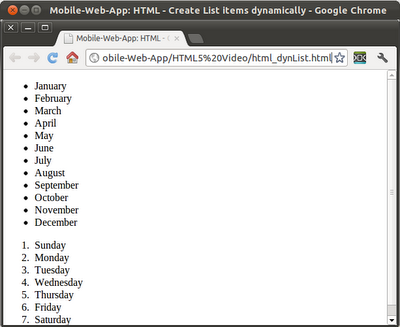
HTML/Javscript - Create List items dynamically

HTML/Javscript - Create List items dynamically
<!DOCTYPE html>
<html lang="en">
<head>
 <meta charset="utf-8">
 <title>Mobile-Web-App: HTML/Javscript - Create List items dynamically</title>

<script>

var montharray = new Array("January",
         "February",
         "March",
         "April",
         "May",
         "June",
         "July",
         "August",
         "September",
         "October",
         "November",
         "December");
         
var weekdayarray = new Array ("Sunday",
          "Monday",
          "Tuesday",
          "Wednesday",
          "Thursday",
          "Friday",
          "Saturday");

function onloaded(){
 var ulist = document.getElementById("unorderedlist");
 var olist = document.getElementById("orderedlist");

 //Generate list items for <ul>
 for (var i = 0; i < montharray.length; i++) {
  var li = document.createElement("li");
  li.innerHTML = montharray[i];
  ulist.appendChild(li);
 }
 
 //Generate list items for <ol>
 for (var i = 0; i < weekdayarray.length; i++) {
  var li = document.createElement("li");
  li.innerHTML = weekdayarray[i];
  olist.appendChild(li);
 }
}
</script> 
 
</head>
<body onload="onloaded()">

<ul id="unorderedlist"></ul>
<ol id="orderedlist"></ol>

</body>
</html>

Related: - jQuery Mobile - Create List items dynamically

Thursday, March 8, 2012

HTML file chooser with accept type

It's a example of HTML file choose with "accept", to accept audio files only.

HTML file chooser with accept type

<!DOCTYPE html>
<html lang="en">
<head>
<meta charset="utf-8">
<title>Mobile-Web-App: HTML file chooser with filter</title>

</head>
<body>

<input type="file" name="filechooser" size="10" accept="audio/*"></input>

</body>
</html>


Next:
- HTML/Javascript: Retrieve file info from input of file type

HTML file chooser

To implement file chooser in HTML, using <input>, with type="file".

HTML file chooser

<!DOCTYPE html>
<html lang="en">
<head>
<meta charset="utf-8">
<title>Mobile-Web-App: HTML file</title>
</head>
<body>

<input type="file" name="filechooser" size="10"></input>

</body>
</html>


Next:
- HTML file chooser with accept type
- HTML/Javascript: input to load multiple file

Monday, February 6, 2012

Selection Menu: Desktop html vs jQuery Mobile

On Desktop:
Desktop version
<!doctype html>
<html>

<head>
<meta charset="utf-8"></meta>
<title>Mobile-Web-App: Selection Menu</title>
</head>
<body>
<h1>Mobile-Web-App</h1>

<label for "dayofweek">Day Of Week:</label>
<select name="dayofweek" id="dayofweek">
<option value="Sunday">Sunday</option>
<option value="Monday">Monday</option>
<option value="Tuesday">Tuesday</option>
<option value="Wednesday">Wednesday</option>
<option value="Thursday">Thursday</option>
<option value="Friday">Friday</option>
<option value="Saturday">Saturday</option>
</select>

</body>
</html>


On jQuery Mobile:
jQuery Mobile version
<!doctype html>
<html>

<head>
<meta charset="utf-8"></meta>
<meta name = "viewport" content = "width = device-width, height = device-height" />
<title>Mobile-Web-App: Selection Menu</title>
<link rel="stylesheet" href="http://code.jquery.com/mobile/1.0/jquery.mobile-1.0.min.css" />
<script type="text/javascript" src="http://code.jquery.com/jquery-1.6.4.min.js"></script>
<script type="text/javascript" src="http://code.jquery.com/mobile/1.0/jquery.mobile-1.0.min.js"></script>

</head>
<body>
<div data-role="page" id="home">
<div data-role="header">
<h1>jQuery Mobile: Selection Menu</h1>
</div>

<div data-role="content">

<label for "dayofweek">Day Of Week:</label>
<select name="dayofweek" id="dayofweek">
<option value="Sunday">Sunday</option>
<option value="Monday">Monday</option>
<option value="Tuesday">Tuesday</option>
<option value="Wednesday">Wednesday</option>
<option value="Thursday">Thursday</option>
<option value="Friday">Friday</option>
<option value="Saturday">Saturday</option>
</select>

</div>

<div data-role="footer">
<h4><a href="http://mobile-web-app.blogspot.com/">http://mobile-web-app.blogspot.com/</a></h4>
</div>

</div>

</body>
</html>


Next:
- jQuery Mobile: select menu inside fieldcontain

Wednesday, December 21, 2011

HTML Media Capture API

It's a example to input image file using W3C HTML Media Capture specification.

Note that not all browse have implemented this feature currently. It's a example run on Firefox for Android 9.0, running on table of HTC Flyer (Android 3.2.1). If user click on the Browse... button, it will open a file browser to select file. If capture button clicked, a camera capture dialog will be open.

HTML Media Capture API

<!DOCTYPE html>
<html>
<head>
<title>HTML5 Capture API</title>
</head>
<body>
<H1>HTML5 Capture API</H1>
<input type="file" accept="image/*" id="capture">
</body>
</html>

Tuesday, November 8, 2011

viewport for Mobile device

If you try the examples in former post, you will get difference appearance on difference browser, even on the same device. We haven't take care about the viewport for mobile device. You can override the default viewport by including a viewport meta tag in the <head> section of your page.

example:
<!DOCTYPE html>
<html>
<head>
<meta name = "viewport" content = "width = device-width, height = device-height" />
<title>jQuery Mobile: Dialog</title>
<link rel="stylesheet" href="http://code.jquery.com/mobile/latest/jquery.mobile.css" />
<script src="http://code.jquery.com/jquery.min.js"></script>
<script src="http://code.jquery.com/mobile/latest/jquery.mobile.min.js"></script>
</head>
<body>

<div data-role="page" id="home">
<div data-role="header">
<h1>Open Dialog</h1>
</div>
<div data-role="content">
<p>Hello ALL</p>
<p>jQuery Mobile: Dialog</p>
<a href="#dialog" data-rel="dialog" data-transition="pop">Open Dialog</a>
</div>
<div data-role="footer">
<h4><a href="http://mobile-web-app.blogspot.com/">http://mobile-web-app.blogspot.com/</a></h4>
</div>
</div>

<div data-role="page" id="dialog">
<div data-role="header">
<h1>mobile-web-app</h1>
</div>
<div data-role="content">
<p>It's a Dialog</p>
<input type="button" value="Close Dialog" onclick="button_clicked()" />
</div>
<div data-role="footer">
<h4><a href="http://mobile-web-app.blogspot.com/">http://mobile-web-app.blogspot.com/</a></h4>
</div>
</div>
<script>
function button_clicked(){
$('.ui-dialog').dialog ('close');
}
</script>
</body>
</html>


Android default browser
Firefox on Android
Opera Mobile on Android