Showing posts with label DART. Show all posts
Showing posts with label DART. Show all posts
Tuesday, June 18, 2013
Google Maps with Dart
see how easy and fun it is to use the Google Maps JS API with Dart, using Alexandre Ardhuin's excellent Dart Google Maps library!
Library on GitHub:
https://github.com/a14n/dart-google-maps

Tuesday, May 14, 2013
Sunday, May 12, 2013
Try Dart in browser
You can try Dart in your browser without installation, by visiting http://try.dartlang.org/.
 |
| Try Dart in Chrome run on Ubuntu |
 |
| Try Dart in Chrome run on Android 4.1.1 |
 |
| Try Dart in Chrome run on Android 4.1.1 |
Wednesday, February 6, 2013
Setter and Getter for private property, in dart.
To define private member in dart, prefix the name with underscore(_) character. This example demonstrate how to implement setter and getter for private member.
class Visitor{
  var _name;   //private property

  set name(value) => _name = value; //setter for private property
  get name => _name;                //getter for private property
}
void main() {
  var visitor = new Visitor();
  visitor.name = "Erik";
  print ("Hello, ${visitor.name}");
}
 |
| Setter and Getter for private property |
"Hello World" to dart, with public property
In this example, the variable name is a public property of class Visitor. It can be access from outside directly.
class Visitor{
  var name;   //public property
}
void main() {
  var visitor = new Visitor();
  visitor.name = "Erik";
  print ("Hello, ${visitor.name}");
}
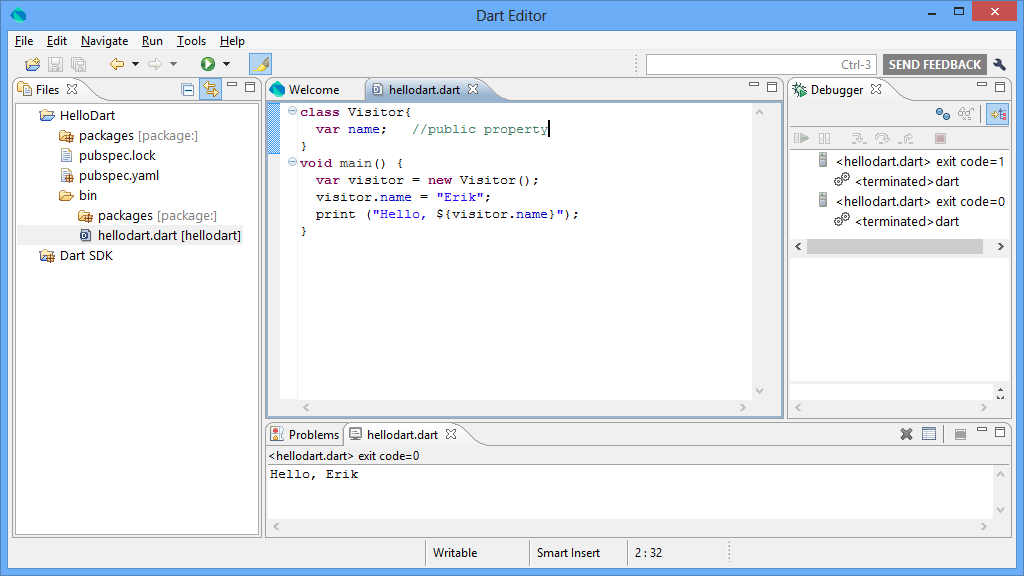 |
| class with public property |

Friday, February 1, 2013
Thursday, January 31, 2013
Dart in Action
Summary
Dart in Action introduces Google's Dart language and provides techniques and examples showing how to use it as a viable replacement for Java and JavaScript in browser-based desktop and mobile applications. It begins with a rapid overview of Dart language and tools, including features like interacting with the browser, optional typing, classes, libraries, and concurrency with isolates. After you master the core concepts, you'll move on to running Dart on the server and creating single page HTML5 web applications.
About the Technology
Dart is a web programming language developed by Google. It has modern OO features, just like Java or C#, while keeping JavaScript's dynamic and functional characteristics. Dart applications are "transpiled" to JavaScript, and they run natively in Dart-enabled browsers. With production-quality libraries and tools, Dart operates on both the client and the server for a consistent development process.
About this Book
Dart in Action introduces the Dart language and teaches you to use it in browser-based, desktop, and mobile applications. Not just a language tutorial, this book gets quickly into the nitty-gritty of using Dart. Most questions that pop up while you're reading are answered on the spot! OO newbies will appreciate the gentle pace in the early chapters. Later chapters take a test-first approach and encourage you to try Dart hands-on.
To benefit from this book you'll need experience with HTML and JavaScript?a Java or C# background is helpful but not required.
Purchase of the print book comes with an offer of a free PDF, ePub, and Kindle eBook from Manning. Also available is all code from the book.
What's Inside
- Dart from the ground up
- Numerous code samples and diagrams
- Creating single-page web apps
- Transitioning from Java, C#, or JavaScript
- Running Dart in the browser and on the server
Chris Buckett builds enterprise-scale web applications. He runs Dartwatch.com and is an active contributor to the dartlang list.
"Includes numerous examples of core language features as well as more advanced HTML5 features."—From the Foreword by Seth Ladd, Developer Advocate, Google
Table of Contents
PART 1 INTRODUCING DART- Hello Dart
- "Hello World" with Dart tools
- Building and testing your own Dart app
- Functional first-class functions and closures
- Understanding libraries and privacy
- Constructing classes and interfaces
- Extending classes and interfaces
- Collections of richer classes
- Asynchronous programming with callbacks and futures
- Building a Dart web app
- Navigating offline data
- Communicating with other systems and languages
- Server interaction with files and HTTP
- Sending, syncing, and storing data
- Concurrency with isolates
PART 2 CORE DART
PART 3 CLIENT-SIDE DART APPS
PART 4 SERVER-SIDE DART
Wednesday, January 9, 2013
New Dart Editor Build with Expanded Windows and Chrome Apps Support

Know more: http://news.dartlang.org/2013/01/new-dart-editor-build-with-expanded-windows-chrome-apps-support.html
Thursday, December 20, 2012
A new Dart Editor build is available

Friday, June 29, 2012
Google I/O 2012 - Dart - A Modern Web Language
The two creators of Dart will discuss the rationale behind Dart's design and its impact on web scalability and performance.
They'll also present how Dart helps developers innovate by increasing their productivity without breaking backwards compatibility.
Google I/O 2012 - Web Programming with Dart
Google I/O 2012 - Putting the App Back into Web App - Web Programming with Dart
Do you want to build blazingly fast applications with beautiful graphics and offline support? Would you like to run those apps anywhere on the open web? Would you like to develop those apps in a language that supports modular large-scale development while keeping the lightweight feel of a scripting language? This session will show you how to use the Dart programming language to develop the next generation of amazing applications for the open web.
Do you want to build blazingly fast applications with beautiful graphics and offline support? Would you like to run those apps anywhere on the open web? Would you like to develop those apps in a language that supports modular large-scale development while keeping the lightweight feel of a scripting language? This session will show you how to use the Dart programming language to develop the next generation of amazing applications for the open web.
Friday, March 30, 2012
New Dart Editor build available

Dart language spec updated to 0.08, and the new Dart Editor build 5845 released with highlights:
- Copy/Paste and show libraries in bold in Files view
- Initial support for excluding files/directories from analysis
- Debugger improvements
- Analysis, Frog, and SDK fixes
Web Site: http://www.dartlang.org/
Monday, February 27, 2012
Hello Dart!
- Install and start DartEditor
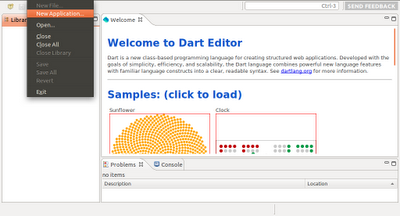
- Click File -> New Application in Eclipse menu
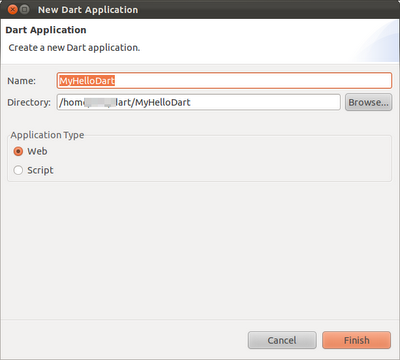
- Enter Name(and also Directory) of your Dart application, check Application Type of Web, and click Finish.
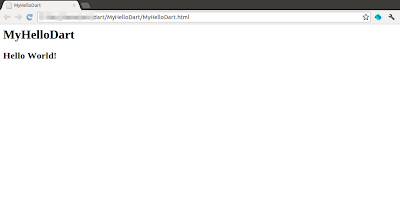
- A dummy Hello World! of Dart will be generated. Click the Run (green arrow) button to start the Dart application. The Hello World! Dart application will be loaded in build-in Chromium with Dart VM.
Remark: if you cannot run the application or cannot generate Javascript because of:
error while loading shared libraries: libcrypto.so.0.9.8: cannot open shared object file: No such file or directory
You have to install libssl0.9.8. Refer to the article: Cannot launch Dart application - error while loading shared libraries: libcrypto.so.0.9.8
- Click File -> New Application in Eclipse menu
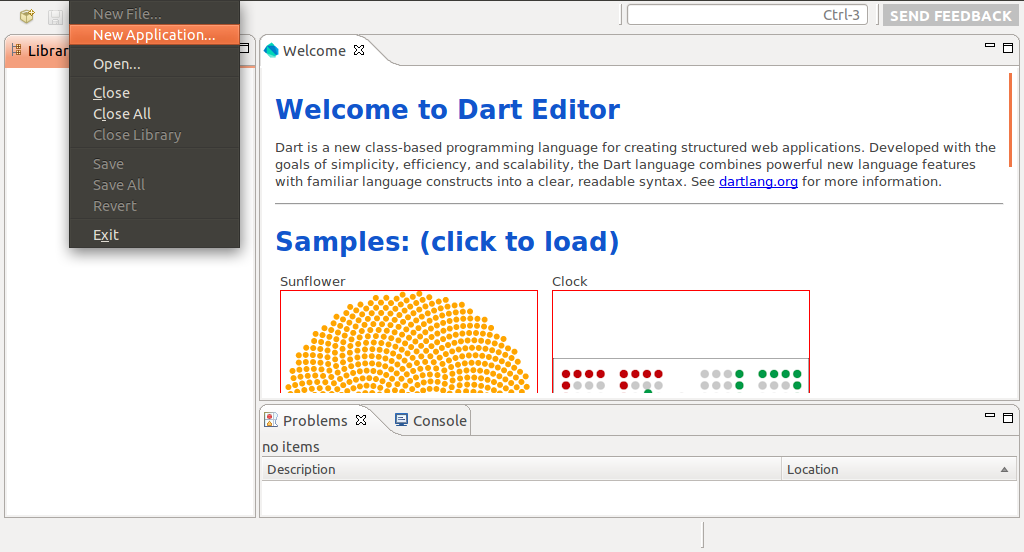
- Enter Name(and also Directory) of your Dart application, check Application Type of Web, and click Finish.

- A dummy Hello World! of Dart will be generated. Click the Run (green arrow) button to start the Dart application. The Hello World! Dart application will be loaded in build-in Chromium with Dart VM.

Remark: if you cannot run the application or cannot generate Javascript because of:
error while loading shared libraries: libcrypto.so.0.9.8: cannot open shared object file: No such file or directory
You have to install libssl0.9.8. Refer to the article: Cannot launch Dart application - error while loading shared libraries: libcrypto.so.0.9.8
Cannot launch Dart application - error while loading shared libraries: libcrypto.so.0.9.8
If you try "Hello World!" for Dart in DartEditor, and face the error:
error while loading shared libraries: libcrypto.so.0.9.8: cannot open shared object file: No such file or directory
You can try to install libssl0.9.8 using the command in Terminal:
$ sudo apt-get install libssl0.9.8:i386
My test platform: Ubuntu 11.10
error while loading shared libraries: libcrypto.so.0.9.8: cannot open shared object file: No such file or directory
You can try to install libssl0.9.8 using the command in Terminal:
$ sudo apt-get install libssl0.9.8:i386
My test platform: Ubuntu 11.10
Sunday, February 26, 2012
Dart Editor
Dart Editor is a lightweight, open-source editor based on Eclipse components. In addition to editing Dart programs, you can use Dart Editor to invoke the Dart-to-JavaScript compiler and launch Dart-based web apps.
Follow the tutorial to install and use Dart Editor on Linux.
These instructions are also available for:
After installed, switch to the Dart installation directory, and run DartEditor.

Follow the tutorial to install and use Dart Editor on Linux.
These instructions are also available for:
After installed, switch to the Dart installation directory, and run DartEditor.

Friday, February 24, 2012
Tech preview of Chromium with Dart VM
Chromium with the Dart VM for Linux and Mac is now available. his technology preview allows you to run your Dart programs directly on the Dart VM in Chromium and avoid a separate compilation step.
This release of Chromium with Dart VM integration is a technology preview, and should not be used for day-to-day browsing. After more testing and developer feedback, it will be eventually included the Dart VM in Chrome.
Link: http://www.dartlang.org/dartium/
Important: This browser is a technical preview, and it might have security and stability issues. Do not use Dartium as your primary browser!
Related: DART: new programming language for web applications
This release of Chromium with Dart VM integration is a technology preview, and should not be used for day-to-day browsing. After more testing and developer feedback, it will be eventually included the Dart VM in Chrome.
Link: http://www.dartlang.org/dartium/
Important: This browser is a technical preview, and it might have security and stability issues. Do not use Dartium as your primary browser!
Related: DART: new programming language for web applications
DART: new programming language for web applications

Dart is a new class-based programming language for creating structured web applications. Developed with the goals of simplicity, efficiency, and scalability, the Dart language combines powerful new language features with familiar language constructs into a clear, readable syntax.
Web Site: http://www.dartlang.org/
Related:
- Tech preview of Chromium with Dart VM
Subscribe to:
Comments (Atom)